
Chapter 9 · 9.3
E-mail Tracking: where did my mail go?
Does a customer say your mail never arrived? Or are you waiting for a mail that just won't come in? With E-mail Tracking you can see what our mail server did with a message: was it delivered, is it being retried, or did it fail?
Looking up a message
- Click E-mail Tracking under E-mail Manager in the menu.
- Choose the period at From and To (1). By default you'll see the last 24 hours.
- If needed, enter the sender's or recipient's e-mail address at Address (2).
- If needed, choose a status at State (3), for example Fail, and the direction at Show: Outbound or Inbound.
- Click SEARCH (4).
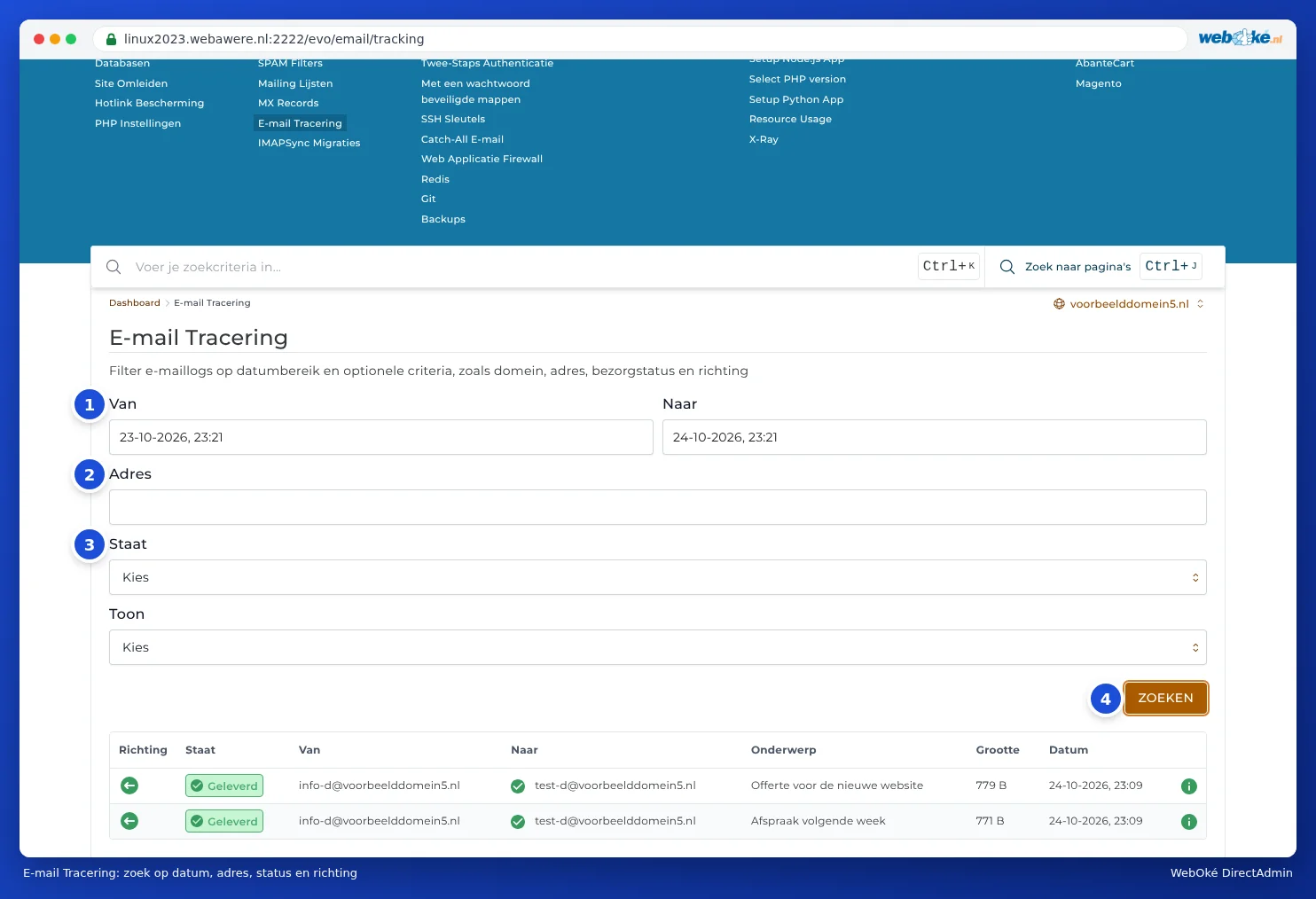
For each message you'll see the Direction (an arrow pointing in or out), the State, the sender (From), the recipient (To), the Subject, the Size and the Date.
What does the status mean?
| State | Meaning | What to do |
|---|---|---|
| Delivered | The recipient's mail server accepted the message. | Nothing more to do on our end. Ask the recipient to check their spam folder. |
| Deferred | The other server didn't accept the message yet, for example because it was busy. Our server automatically tries again. | Wait a little while. If it stays deferred, check the details to find out why. |
| Fail | The message was rejected and won't arrive. The sender gets an error message back. | Check the details and read Verzenden geweigerd: blacklists en limieten. |
| Unknown | The server can't determine the outcome. | Check the details, or ask support to take a look. |
The details of a message
Click the circle with the i on the right of the row. You'll then see all the details of that message, such as the time, the status (state), the direction (direction), the subject and the server it came from (host).

Tip: Asking support for help with a message that isn't arriving? Give them the id from this window, along with the time and the addresses. Then we can find the message straight away.
Good to know
- E-mail Tracking only shows what our server did with a message. If it says Delivered but the recipient still doesn't have it, the issue is on their end, usually in their spam folder (see My mail ends up in the recipient's spam folder).
- If an expected incoming mail doesn't appear in the list at all, it never reached our server. Check whether the sender used the correct address and whether your MX records are set up correctly (see MX records: where does your e-mail arrive? and Ik ontvang geen e-mail meer).
- Logs are kept for about a month. You won't find older messages here anymore.
- You'll only see messages for the domains in your own package.